Claude is an AI made by Anthropic. The name covers both a family of AI models and the app you talk to them in, which you can use on the web at claude.ai, on desktop or on your phone. For a novelist, it can work like a patient first reader you can call on at any hour: it asks questions, gives notes and explains its edits. Used carelessly, it can smooth your voice into something generic and give confident notes on chapters it never saw.
This guide covers where Claude helps a novelist, five ways to use it with prompts you can copy, how to keep your voice, how to keep a long manuscript consistent, and what Amazon KDP asks if Claude drafted any of your text.
One note before we start. This guide comes from Inkbound, a Mac app whose AI writing staff is powered by Claude. Everything up to the last section works in Claude on its own. The last section, clearly marked, is about Inkbound.
Where Claude helps a novelist
Claude is at its most useful on jobs made of language: questions, plans, notes and edits. For a novelist, that covers five jobs.
- Brainstorming. Testing a premise, asking what if, finding names, and working out what a character wants. It can give you many options quickly, and you pick the one that is true to your book.
- Outlining. Turning the beats you have planned into a chapter plan, and showing you where that plan has holes.
- Developmental feedback. A read on structure, pacing, stakes and character arcs. It can tell you where its attention dropped and why, which is what a first reader is for.
- Line edits that keep your voice. Tightening sentences, catching repeated words and fixing grammar, with a note on every change so you decide what stays.
- Blurbs. Two or three angles on your back-cover copy, as raw material for the version you write. Our guide on how to write a book blurb has the formula to hold them against.
It also has limits worth knowing before you start. It only knows the pages you give it. It can sound sure and still be wrong: Anthropic's help center says Claude can occasionally give responses that are incorrect or misleading, including ones that look correct. And a scene drafted from a two-line prompt has only those two lines of your book to go on, so it tends toward the familiar. None of that rules Claude out. It shapes how to use it: give it your own pages and a narrow job, then check what comes back.
Five ways to use it, with prompts
Each prompt below gives Claude one narrow job and leaves the decisions with you. Replace the words in square brackets with your own. Claude can read Word documents, PDFs and plain text files, so you can upload chapters instead of pasting them.
1. Question your premise
Before you outline, ask Claude for questions instead of answers. Questions pull the ideas out of you. Answers hand you someone else's.
Prompt
Here is the premise of my novel: [two or three sentences]. Don't suggest plot ideas. Ask me ten questions, one at a time, that would sharpen this premise: what my main character wants, what stands in the way, what they stand to lose, and what the book is really about. Wait for my answer before you ask the next question.
When you are done, ask Claude to sum up your answers in one paragraph, using your words. That paragraph can become the first draft of your synopsis.
2. Turn your beats into a chapter outline
The hard part of an outline is already yours: the beats. Claude's job here is structure, not invention.
Prompt
Here are the story beats for my novel, in order: [your beats]. Turn them into a chapter-by-chapter outline of about [number] chapters, with one line on what changes in each chapter. Use only my beats. Where the story needs an event I haven't planned, write [GAP] and describe what is missing instead of inventing it.
The gaps are the useful part. Each one is a decision you still need to make, and the marker stops Claude from making it for you.
3. Find where the middle drags
This one needs more of the book than the others. Give Claude the stretch you are worried about, plus a one-page synopsis of the whole story so it knows what the middle is building toward.
Prompt
Here is a one-page synopsis of my novel, followed by chapters [8] to [14]. Read them as a developmental editor. Where does the pace drag, and why? Point to specific scenes and quote the line where your attention drops. Don't rewrite anything. Rank your notes from the biggest structural problem to the smallest.
Asking for quotes lets you check each note against the page. A note that cannot point to a line is a guess.
4. A line edit with notes
Line edits are where a voice is easiest to lose, so ask for changes you can see and turn down one at a time.
Prompt
Line edit this passage for clarity and rhythm. Keep my voice, my [past tense, close third person], and my word choices where they work. Show the edited passage, then list every change with a one-line reason, so I can accept or reject each one.
Then make the changes you agree with yourself, in your manuscript. Typing them in gives the passage a second read, and nothing lands in the book that you did not choose.
5. Blurb angles to cut and combine
A blurb is short enough that seeing three versions side by side helps you hear which hook is strongest.
Prompt
Here are my notes on my novel: the genre, the main character, what goes wrong, what it will cost them, and the central question: [your notes]. Write three back-cover blurbs of about 150 words each, from three angles: the character, the danger and the question. Don't reveal the ending.
Treat the three as raw material. Take a line from one and a turn from another, then rewrite the result until it sounds like you.
Keep your voice
Your voice is the sum of small choices: how long your sentences run, what you leave out, the words a character would never use. Claude cannot see those choices unless you show them, and its own defaults fill any gap you leave. A few habits keep the voice yours.
- Show a sample, and say what matters. Paste a page of your writing and name what makes it yours: short sentences in action scenes, plain dialogue tags, American spelling, whatever is true for you.
- Write a style sheet once. List your tense, point of view, spelling, how you set dialogue, and the words you never use. In a Claude project, the instructions you set apply to every chat in that project, so a project is a good home for the style sheet. Claude also lets you set preferences that apply across all your conversations.
- Ask for notes, not prose. "Mark the sentences that feel flat and say why" keeps the rewriting with you. "Rewrite this chapter" hands it over.
- Read every change aloud. A sentence that sounds smooth but not like you is one to turn down.
- Keep the manuscript outside the chat. Your file is the master copy. Claude's replies are notes on it, not a new version of it.
The long-manuscript problem
A novel is long. Most adult novels run 70,000 to 100,000 words (here is how many words a novel needs, by genre), and Claude can only work with what is in front of it. Four things tend to go wrong when you take a whole manuscript to a chat app.
Pasting chapters in
Claude's help center describes its context window as the amount of information Claude can work with in a single chat. Paste chapter 12 on its own, and Claude has only your word for what happened in chapter 3. Its notes will fit the pages it has, which may not be the book you wrote.
Characters drift between sessions
A new chat does not start with your last chat's pages. Claude has two features that help: memory, which carries context over from past conversations, and Projects, which keep context, instructions and files together. Even so, its help center notes that context is not shared across chats within a project unless the information is added to the project knowledge. If a minor character's eye color lives only in last Tuesday's chat, expect it to change.
Usage limits and stale copies
Every Claude plan has usage limits, and the help center says the length and complexity of your conversations are among the things that affect your usage. A manuscript is long, so book-length chats use more. When the files in a project grow close to what Claude can hold in one chat, the help center says paid plans switch on a retrieval mode that loads only the relevant content. That makes room, but a question about the whole book may then be answered from the passages Claude pulled in.
Then there are stale copies. When you revise chapter 7, the copy you gave Claude is still the old one until you upload the new file. A note about a scene you already cut is the sign.
Checking facts
Check what Claude says about your book against your book, and what it says about the world against a source you trust: dates, places, how a police procedure or a sailing ship works. When a note matters, ask Claude for the line behind it, then find that line in your manuscript.
The fix: a story bible
The working fix is one document that holds the facts of your book: every character's name, age, looks, history and relationships, plus places, the timeline and the rules of your world. That is a story bible. Keep it next to a one-page synopsis, and update both as you write. Our story bible template has the sections ready to copy.
With those two documents, a session with Claude goes like this:
- Start a chat, or open your project, with the story bible and the synopsis in it.
- Add only the chapters the question needs, plus the ones on either side.
- Ask for notes with chapter numbers and quoted lines.
- Check every note against your manuscript, and make your changes there.
- Add anything new to the story bible, then replace the old files in your project.
It takes some bookkeeping, but it means Claude works from the same facts you do.
What KDP asks if Claude drafts text
Amazon KDP sorts AI use into two kinds. Its content guidelines count text, images or translations created by an AI-based tool as AI-generated, "even if you applied substantial edits afterwards," and KDP requires you to say so when you publish a new book or republish an edited one. Content you created yourself and then edited, refined or error-checked with AI is AI-assisted. So is brainstorming with AI when you then wrote the text yourself. KDP does not ask you to disclose AI-assisted content.
For the prompts in this guide, that puts questions about your premise, an outline built from your beats, notes on pacing and line edits to your own passages on the AI-assisted side. A scene or chapter Claude drafted is AI-generated, however much you rewrite it. Keep a short note of anything Claude drafted, and you will have the answer ready when KDP asks. Our guide to KDP AI disclosure sorts the common cases, covers included.
Using Claude inside your book
This section is about our own app. Inkbound is a Mac app that takes a book from blank page to the files KDP asks for, in one project. Its AI writing staff is powered by Claude: a Co-Writer, a Developmental Editor, a Line Editor, a Publishing Coach, a Blurb Writer and a Book Designer, in one chat.
It comes at the long-manuscript problem from the other side. In a chat app, you bring the book to the AI. In Inkbound, the AI comes to the book.
- The whole book, every message. Each message carries every chapter, your synopsis, your interior settings and your Story Bible of characters and places. There is nothing to paste, and nothing out of date.
- Chat changes wait for Apply. In the chat, a change the staff suggests arrives as a card that says what it will change and where. Nothing moves until you press Apply. The AI Writer works differently: ask it for the next chapter and it drafts one straight into your book, for you to edit, keep or delete.
- No API key. There is no AI account to open and no key to paste. The staff runs on AI credits you buy in the app, in packs from $9.99, and every new account includes 50.
- Not used to train AI. We do not use your writing to train AI models, and we do not allow our AI providers to use it for training. The details are in our privacy policy.
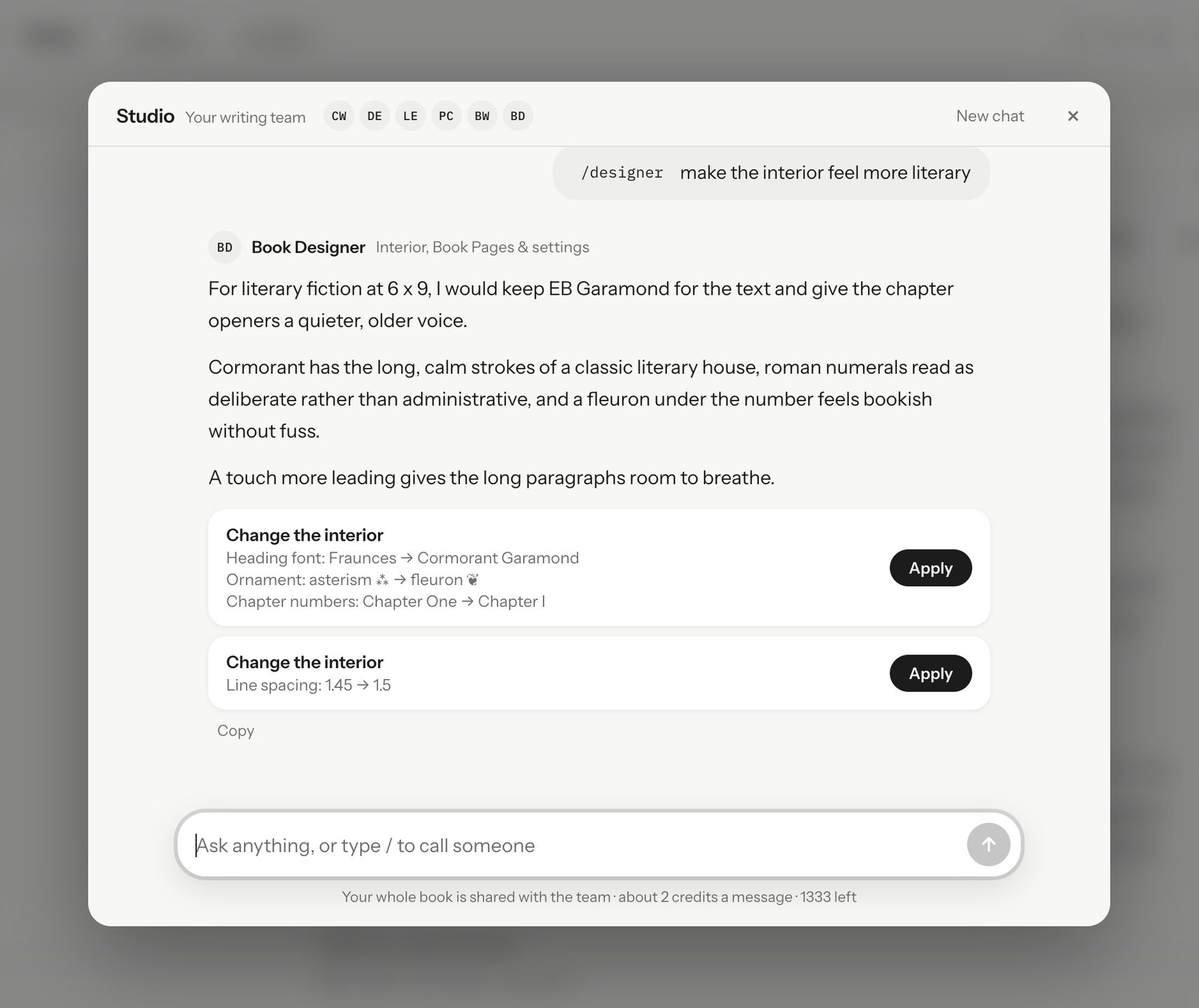
KDP's rules work the same way here. Co-Writer text you apply and chapters the AI Writer drafts count as AI-generated, while Line Editor fixes to your own writing count as AI-assisted. You can also write without AI at all. The staff only reads your book when you start an AI action, and your books are saved on your Mac.
Inkbound runs on Apple Silicon Macs with macOS 12 or later, and it needs a plan: $1 for your first 7 days, then $14.99 a month until you cancel, or Lifetime for $129 once, for as long as we offer Inkbound. AI credits are separate from both. Compare Monthly or Lifetime.
Whichever way you work, use Claude for questions, notes and edits, and keep the choices that make the book yours.
Claude facts checked on October 22, 2026, against Anthropic's pages linked above. KDP's rules checked the same day against its content guidelines. Both can change, so read the current wording before you rely on it.