Trim size is the finished width and height of your printed book, measured after the pages are cut. On Amazon KDP it's one of the first print decisions you make, and it sets almost everything after it: how many words fit on a page, how many pages the book runs, how wide the inside margin must be, how wide the spine is, and what each copy costs to print. Here are all the KDP trim sizes for the US, with the numbers you need to choose one.
The quick answer
- 6 × 9 in is the most common trim size for paperbacks in the US, in KDP's own words, and it's the size KDP starts you on when you set up a paperback.
- Most novels use 5 × 8, 5.25 × 8, 5.5 × 8.5 or 6 × 9 in.
- KDP lists 16 paperback trim sizes for the US. For a paperback you can also enter a custom size from 4 to 8.5 in wide and 6 to 11.69 in tall.
- Hardcovers come in five sizes, from 75 to 550 pages.
- A book wider than 6.12 in or taller than 9 in is a large trim size, and it costs more to print.
The full KDP paperback trim size chart
These are the 16 paperback sizes KDP lists for kdp.amazon.com, with the page counts it allows for each ink and paper, from the minimum to the maximum. KDP splits them into regular and large trim sizes, and so does the chart.
| Trim size | Black ink, white | Black ink, cream | Black ink, groundwood | Standard color | Premium color |
|---|---|---|---|---|---|
| Regular trim sizes | |||||
| 5 × 8 in | 24 to 828 | 24 to 776 | 24 to 812 | 72 to 600 | 24 to 828 |
| 5.06 × 7.81 in | 24 to 828 | 24 to 776 | 24 to 812 | 72 to 600 | 24 to 828 |
| 5.25 × 8 in | 24 to 828 | 24 to 776 | 24 to 812 | 72 to 600 | 24 to 828 |
| 5.5 × 8.5 in | 24 to 828 | 24 to 776 | 24 to 812 | 72 to 600 | 24 to 828 |
| 6 × 9 in | 24 to 828 | 24 to 776 | 24 to 812 | 72 to 600 | 24 to 828 |
| Large trim sizes | |||||
| 6.14 × 9.21 in | 24 to 828 | 24 to 776 | 24 to 812 | 72 to 600 | 24 to 828 |
| 6.69 × 9.61 in | 24 to 828 | 24 to 776 | 24 to 812 | 72 to 600 | 24 to 828 |
| 7 × 10 in | 24 to 828 | 24 to 776 | 24 to 812 | 72 to 600 | 24 to 828 |
| 7.44 × 9.69 in | 24 to 828 | 24 to 776 | 24 to 812 | 72 to 600 | 24 to 828 |
| 7.5 × 9.25 in | 24 to 828 | 24 to 776 | 24 to 812 | 72 to 600 | 24 to 828 |
| 8 × 10 in | 24 to 828 | 24 to 776 | 24 to 812 | 72 to 600 | 24 to 828 |
| 8.25 × 6 in | 24 to 800 | 24 to 750 | 24 to 784 | 72 to 600 | 24 to 800 |
| 8.25 × 8.25 in | 24 to 800 | 24 to 750 | 24 to 784 | 72 to 600 | 24 to 800 |
| 8.27 × 11.69 in | 24 to 780 | 24 to 730 | 24 to 764 | Not available | 24 to 590 |
| 8.5 × 8.5 in | 24 to 590 | 24 to 550 | 24 to 578 | 72 to 600 | 24 to 590 |
| 8.5 × 11 in | 24 to 590 | 24 to 550 | 24 to 578 | 72 to 600 | 24 to 590 |
A few things in the chart are easy to miss:
- Standard color starts at 72 pages, not 24, and it isn't offered at all on 8.27 × 11.69 in, the A4 size.
- The square, landscape, letter and A4 sizes hold fewer pages. On white paper, 8.25 × 6 and 8.25 × 8.25 in stop at 800 pages, 8.27 × 11.69 in at 780, and 8.5 × 8.5 and 8.5 × 11 in at 590.
- Cream paper is thicker than white, so every size allows fewer cream pages. At most sizes that's 776 pages instead of 828.
- Groundwood is a newer KDP paper for black-ink paperbacks only. It costs about 5% less per page than white or cream, and KDP doesn't recommend it for pages with heavy ink coverage.
- KDP counts the pages in your interior file and rounds up to an even number if it needs to.
If you format in Microsoft Word, KDP offers a Word template in each trim size, with or without sample content. For margins, front matter and the files to upload, see our guide on how to format a book for KDP.
KDP hardcover trim sizes
KDP prints hardcovers in five sizes, each from 75 to 550 pages:
| Trim size | Class | Black ink, white | Black ink, cream | Premium color |
|---|---|---|---|---|
| 5.5 × 8.5 in | Regular | 75 to 550 | 75 to 550 | 75 to 550 |
| 6 × 9 in | Regular | 75 to 550 | 75 to 550 | 75 to 550 |
| 6.14 × 9.21 in | Large | 75 to 550 | 75 to 550 | 75 to 550 |
| 7 × 10 in | Large | 75 to 550 | 75 to 550 | 75 to 550 |
| 8.25 × 11 in | Large | 75 to 550 | 75 to 550 | 75 to 550 |
Groundwood paper and standard color aren't available for hardcovers. KDP hardcovers are case laminate: the art is printed straight onto the cover, with no dust jacket, and cloth binding isn't offered. Custom sizes are for paperbacks only, so a hardcover has to use one of these five. Hardcovers can't join Expanded Distribution, and they aren't available on Amazon.co.jp.
8.25 × 11 in is on KDP's hardcover list, but it isn't in KDP's paperback page-count chart, which is why the chart above has 16 sizes. It does fall inside KDP's custom range for paperbacks, covered next. And when a book fits both sets of rules, as a 300-page 6 × 9 novel does, KDP says you can upload an interior file with the same measurements for the paperback and the hardcover. If your ISBN is printed in the interior, change it to the hardcover's ISBN first.
Custom trim sizes
For a paperback, KDP lets you enter your own size instead of picking one from the chart. The width can be anything from 4 to 8.5 in and the height anything from 6 to 11.69 in. You set the trim size in the Print Options section of the paperback's Content tab. 6 × 9 in is the default there, and Select a different size lets you change it.
A custom size is useful when a book has to match something that already exists, such as an earlier edition or a series printed at a size KDP doesn't list. Keep three things in mind:
- The large trim rule still applies. A custom size wider than 6.12 in or taller than 9 in prints at the large trim price.
- Check Expanded Distribution. KDP's eligibility chart has no row for custom sizes, so check with KDP before you count on bookstores and libraries.
- Hardcovers can't use custom sizes. If you plan a hardcover edition too, one of the five hardcover sizes keeps both editions alike.
KDP trim sizes with bleed
Most novels don't need bleed. You need it only when an image or a block of color runs off the edge of the page. Then the PDF page is set 0.125 in wider and 0.25 in taller than the trim, because that extra is cut away from the top, bottom and outside edges. KDP's own example is a 6 × 9 in book set up on a 6.125 × 9.25 in page. Here is every paperback size worked out:
| Trim size | Page size with bleed |
|---|---|
| 5 × 8 in | 5.125 × 8.25 in |
| 5.06 × 7.81 in | 5.185 × 8.06 in |
| 5.25 × 8 in | 5.375 × 8.25 in |
| 5.5 × 8.5 in | 5.625 × 8.75 in |
| 6 × 9 in | 6.125 × 9.25 in |
| 6.14 × 9.21 in | 6.265 × 9.46 in |
| 6.69 × 9.61 in | 6.815 × 9.86 in |
| 7 × 10 in | 7.125 × 10.25 in |
| 7.44 × 9.69 in | 7.565 × 9.94 in |
| 7.5 × 9.25 in | 7.625 × 9.5 in |
| 8 × 10 in | 8.125 × 10.25 in |
| 8.25 × 6 in | 8.375 × 6.25 in |
| 8.25 × 8.25 in | 8.375 × 8.5 in |
| 8.27 × 11.69 in | 8.395 × 11.94 in |
| 8.5 × 8.5 in | 8.625 × 8.75 in |
| 8.5 × 11 in | 8.625 × 11.25 in |
With bleed, the outside, top and bottom margins grow from at least 0.25 in to at least 0.375 in, and you upload the interior as a PDF. If even one page bleeds, KDP asks for the whole file to be set up with bleed. Without bleed, the page size is simply the trim size.
Large trim sizes and printing cost
KDP calls a book a large trim size if it's wider than 6.12 in or taller than 9 in, and large trims cost more to print. Of the 16 paperback sizes, five are regular: 5 × 8, 5.06 × 7.81, 5.25 × 8, 5.5 × 8.5 and 6 × 9 in. Everything else is large, including 6.14 × 9.21 in, which looks almost the same as 6 × 9 on a shelf but crosses the 6.12 in line.
Here is how KDP prices a black-ink paperback on white or cream paper sold on Amazon.com:
| Page count | Regular trim | Large trim |
|---|---|---|
| 24 to 110 pages | $2.30 per book | $2.84 per book |
| 110 to 828 pages | $1.00 per book plus $0.012 per page | $1.00 per book plus $0.017 per page |
For a 300-page book, that's $1.00 + (300 × $0.012) = $4.60 at a regular trim, and $1.00 + (300 × $0.017) = $6.10 at a large trim. KDP takes the printing cost out of your royalty on every copy, so unless you raise your list price, the extra $1.50 comes out of what you earn. Color ink costs more, groundwood costs a little less, and bleed and cover finish don't change the price at all. Costs also differ from one Amazon marketplace to another.
To see what your page count costs to print at your trim, ink and list price, and what each sale leaves you, try our KDP royalty calculator. For the rest of the budget, see what it costs to self-publish a book.
Which trim size for your book
Start with what readers in your genre already hold. Pull a few recent paperbacks like yours off the shelf, or check the dimensions in the product details of their Amazon listings, and match them. A book that's an odd size for its genre stands out for the wrong reason. Then check your choice against the cost and distribution rules on this page.
| Book | Common trim sizes | Worth knowing |
|---|---|---|
| Novel | 5 × 8, 5.25 × 8, 5.5 × 8.5 or 6 × 9 in | All four are regular sizes. A smaller trim turns the same words into a longer, thicker book. |
| Memoir | 5.5 × 8.5 or 6 × 9 in | Both can join Expanded Distribution on white, cream or groundwood paper. |
| Non-fiction | 6 × 9 in, or 5.5 × 8.5 in for a shorter book | 6 × 9 in is the most common US paperback size, in KDP's words. |
| Poetry | 5 × 8, 5.5 × 8.5 or 6 × 9 in | A wider page lets long lines run without breaking. |
| Children's chapter book | 5 × 8, 5.25 × 8 or 5.5 × 8.5 in | Regular sizes keep the printing cost down. |
| Cookbook | 8 × 10 or 8.5 × 11 in | Both are large trims, and color ink costs more to print. |
| Workbook or textbook | 7 × 10 or 8.5 × 11 in | Room to write in and space for diagrams. Both are large trims. |
| Picture book | 8.5 × 8.5, 8.25 × 8.25 or 8 × 10 in | 8.25 × 8.25 in can't join Expanded Distribution, and 8.5 × 8.5 in can only with color ink. |
| Photo or coffee table book | 8.5 × 8.5, 8.5 × 11 or 8.25 × 6 in | 8.25 × 6 in is the only landscape size in KDP's paperback chart. |
One honest note on picture books. A book with art running to the edge of every page needs an interior set up with bleed. Inkbound sets interiors without bleed, for books where the text leads, so a full-bleed picture book is a job for a layout tool that supports interior bleed.
How trim size changes page count, gutter and spine
Trim size is the first number in a chain. Change it and the rest of the print numbers move with it:
- Page count. A smaller page holds fewer words, so the same manuscript runs to more pages at 5 × 8 in than at 6 × 9 in. Font, type size and line spacing move it too. Our guide to how word count becomes page count has words per page for common trims.
- The gutter. KDP's minimum inside margin grows with page count: 0.375 in up to 150 pages, 0.5 in from 151 to 300, 0.625 in from 301 to 500, and wider again past that. If a smaller trim pushes your book past 300 pages, it also needs the wider gutter. The full table is in our KDP formatting guide.
- The spine. Spine width is page count times paper thickness: 0.002252 in per page on white paper, 0.0025 in on cream and 0.00235 in on groundwood. Every 100 pages adds about 0.23 to 0.25 in, depending on the paper.
- The cover. A paperback cover is one wrap: back, spine and front, plus bleed. Its height comes from the trim, and its width from the trim and the spine, so a new trim means a new cover size. Our KDP cover calculator gives the spine width and full-wrap size for any trim, page count and paper.
- The printing cost, through both the page count and the regular or large price.
That's why the trim comes first and the cover comes last. Settle the size, typeset the interior, and size the cover from the final page count. Every cover number, from bleed to the barcode area, is in our guide to KDP book cover size.
Trim size and Expanded Distribution
Expanded Distribution makes your paperback available to distributors, so bookstores, libraries and other retailers can find it and order it. Not every size can join. Eligibility depends on ink and paper as well as trim, and KDP says these rules come from its distributors. Here is KDP's chart:
| Trim size | Black ink, white | Black ink, cream | Black ink, groundwood | Standard color | Premium color |
|---|---|---|---|---|---|
| 5 × 8 in | Yes | Yes | Yes | Yes | No |
| 5.06 × 7.81 in | Yes | No | No | Yes | No |
| 5.25 × 8 in | Yes | Yes | Yes | Yes | No |
| 5.5 × 8.5 in | Yes | Yes | Yes | Yes | Yes |
| 6 × 9 in | Yes | Yes | Yes | Yes | Yes |
| 6.14 × 9.21 in | Yes | No | No | Yes | Yes |
| 6.69 × 9.61 in | Yes | No | No | Yes | No |
| 7 × 10 in | Yes | No | No | Yes | Yes |
| 7.44 × 9.69 in | Yes | No | No | Yes | No |
| 7.5 × 9.25 in | Yes | No | No | Yes | No |
| 8 × 10 in | Yes | No | No | Yes | Yes |
| 8.25 × 6 in | No | No | No | No | No |
| 8.25 × 11 in | No | No | No | No | No |
| 8.25 × 8.25 in | No | No | No | No | No |
| 8.5 × 8.5 in | No | No | No | Yes | Yes |
| 8.5 × 11 in | Yes | No | No | Yes | Yes |
Only 5.5 × 8.5 and 6 × 9 in are open on every ink and paper. Cream and groundwood paper qualify only at 5 × 8, 5.25 × 8, 5.5 × 8.5 and 6 × 9 in, so a large-trim book on cream paper can't join. The A4 size and custom sizes aren't in the chart, and hardcovers can't join at all. If you switch paper later, check the chart again, because eligibility can change with paper type.
Expanded Distribution pays a 40% royalty on the list price, minus printing costs, taxes and withholding. Enrolling doesn't promise that a bookstore or library will order the book; that choice stays with them.
Can you change trim size after publishing?
No. Once a paperback or hardcover is published, KDP locks its trim size, along with details such as the ISBN and the publication date. To print at a different size, you publish a new edition of the book.
Paper is more flexible. A black-ink paperback can switch between white, cream and groundwood after it's published. The new paper changes the spine width, so depending on your page count you may need to upload a new cover file. Books printed in color can't switch paper.
So choose the trim before you publish, and look at it in your hands if you can. KDP recommends ordering a proof copy before publication to check your ink and paper choice, and the same proof shows you the size.
Setting a trim in Inkbound
Inkbound is a Mac app that takes a book from draft to KDP files in one project, and trim size is one setting the whole project shares. You can set it while you design the interior or in the Cover lab, and both read the same size.
- Sizes from KDP's lists. The trim menu is built from KDP's paperback and hardcover charts. It includes 8.25 × 11 in from the hardcover list, a size that also fits KDP's custom range for paperbacks.
- Custom paperback sizes. Choose Custom size and type any paperback size from 4 × 6 in up to 8.5 × 11.69 in. Between the menu and the custom range, every size in KDP's paperback chart can be set.
- Hardcover. For a hardcover, the menu offers KDP's five hardcover sizes, and custom sizes stay paperback only, as they are at KDP.
- A starting size for each book type. Novel and Memoir start at 5.5 × 8.5 in, Non-fiction at 6 × 9, Poetry at 5 × 8, Cookbook at 8 × 10 and Coffee table at 8.25 × 8.25. You can change the trim at any time.
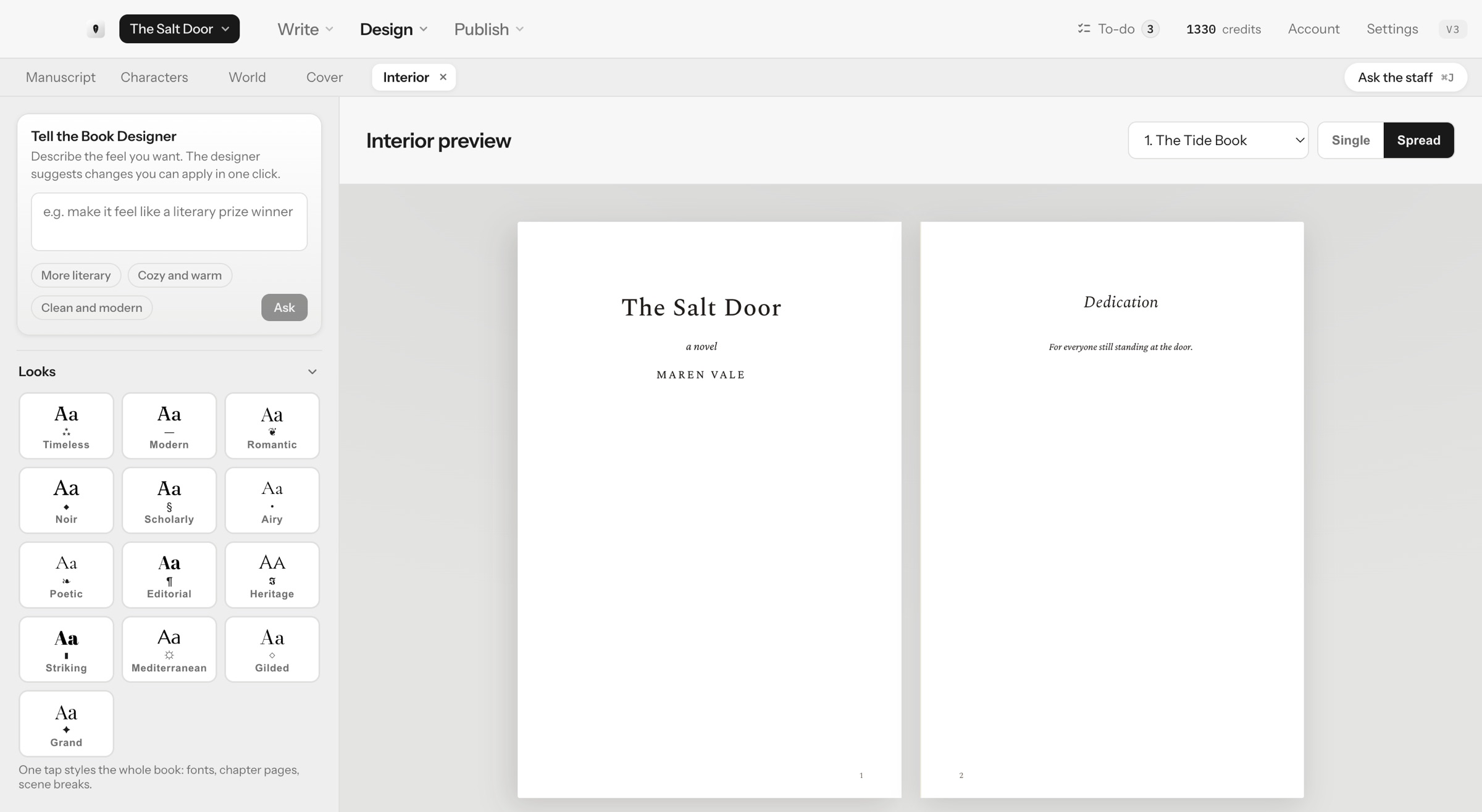
Whatever size you choose, the rest of the book follows it. The preview, the print PDF, the page count and the cover wrap all follow the trim, custom sizes included. The print PDF is typeset with mirrored margins, and Inkbound checks the inside margin against your page count; if yours is narrower than KDP's minimum, it is widened for print. Change the trim later and the book reflows, and the Cover lab sizes the wrap to match. See book formatting in Inkbound for the Looks, the preview and the export.
When the book is ready, Publish checks that the cover's page count still matches your manuscript, then exports each edition from the same project. Finished-file downloads unlock with your first $14.99 month or with Lifetime, not during the $1 week.
Once the trim is set, the rest of the upload is in our step-by-step guide to self-publishing a book on Amazon KDP.
KDP figures checked on October 22, 2026, against KDP's help pages on trim size, bleed and margins, paperback submission guidelines, print options, hardcover, paperback printing cost, Expanded Distribution and updating a published book. KDP updates its specifications from time to time, so check the current numbers before you publish.